As AI-assisted software development becomes more widely adopted, more of the Ruby code in our Rails apps is being written by agents. Each team has its own conventions for how that code should look and behave, and we want those conventions enforced automatically rather than relying on the agent to remember them on its own. This is part of a broader practice called harness engineering, using tools, guardrails, validators, and persistence to increase the probability that our agents produce the outcomes we want. A capable model is only part of the equation. The rest is everything we put around it, including the context it operates within, the rules it follows, and the checks that catch its mistakes.
The concept of harness engineering in software development is still in its early stages and there aren’t many resources on how to implement an agent harness within the context of Rails applications. At thoughtbot, we’re experimenting with how to encode how we work into various tools and contexts in order to increase the quality of the AI output. This post walks through one specific piece of the harness we’ve been building. It’s a Claude Code hook that runs RuboCop against any Ruby files the agent touches, gives the agent a chance to fix what it can, and surfaces what it can’t.
Rules as the First Layer
We recently released a set of Claude Code rules
designed to be dropped into a project’s .claude/ directory so that coding agents can follow thoughtbot’s Rails
conventions when writing code. It aims to ensure that when coding agents generate or modify code in a Rails
project, that they adhere to conventions like TDD, RESTful routes, and strong params. You can use this as a
starting point to add information specific to your project and the coding agent will use and update it when doing
work. Think of it as a living memory for your coding agent, keeping track of architectural decisions, edge cases,
and team conventions.
The rules and context in these files are the feedforward/inferential aspect of our user harness. They guide the agent before and during work so that it increases the odds of getting the job right the first time. A linter can flag a 250-line controller action that’s doing too much but it can’t tell you which of those lines belong in the model. That’s where the agent can really add value, and where a good set of rules makes the difference.
But rules alone aren’t enough. A good set of rules and a detailed yet concise CLAUDE.md file can greatly increase
the quality of the agent’s code, but because results are non-deterministic, it isn’t guaranteed that the agent
won’t make mistakes. This is where adding a
feedback/computational
aspect to our user harness can empower agents to fix their own mistakes and produce the results we want with less
and less hand-holding. The rest of this post focuses on one specific feedback loop, using a Claude Code hook to run
RuboCop on the Ruby files the agent has touched, and giving it a chance to fix any violations.
Claude Code Hooks for Deterministic Behavior
This aspect of the user harness gives us deterministic control over the output of the code by using hooks. Hooks are custom shell commands, LLM prompts, or HTTP endpoints we define that can run when certain events happen in Claude Code’s lifecycle. This way, we can enforce certain actions always run rather than hoping the agent decides to do them.
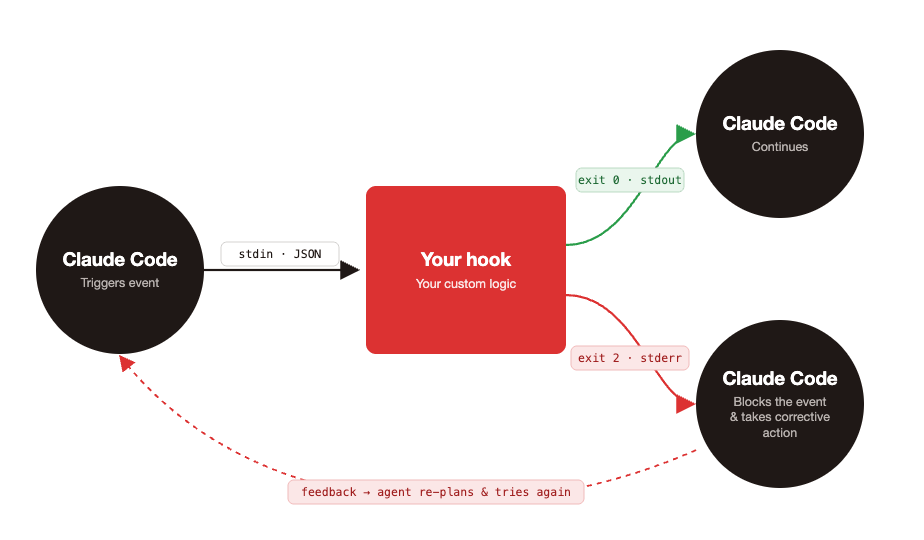
Your custom hooks and Claude Code communicate with each other via stdin, stdout, stderr, and exit codes. When
your custom hook is executed, Claude Code passes event-specific data as JSON to your script’s stdin. Then your
script tells Claude Code what to do next by either writing to stdout or stderr with a specific exit code. These
scripts can run linters or prevent the agent from taking destructive actions, for example. An exit code of 0
tells Claude Code to proceed with whatever action it was performing. For many events your script hooks into, an
exit code of 2 (with a stderr message) is used by Claude Code as feedback. Claude Code will use this
information to block whatever event triggered it and take corrective action.
Enforcing Ruby Style Guide Adherence
Lets look at an example with Rubocop. You may already have a pre-commit hook that runs rubocop with the
--autocorect flag to fix things that are considered safe to auto-fix like style linting rules. Having this in a
pre-commit hook that’s shared across your team, ensures you have a last line of defense when shipping code.
Depending on the plugins you use though, there may be errors that surface which require judgement and reasoning in
order to fix. These are fixes you make manually and that sometimes require knowledge of the architecture and other
parts of the codebase. Injecting Rubocop into an agent’s lifecycle in the form of a hook (in addition to a
pre-commit hook) can increase the trustworthiness of the agent’s output. Violations come back to the agent
immediately while the change is in working memory and the agent can fix them in the same turn. These include fixes
of the more complicated errors that require knowledge of other parts of the codebase. Here’s a simplified setup to
get this up and running on your project.
In .claude/hooks/rubocop-gate.sh, we’ll add a script that runs Rubocop and instructs the agent on how to fix
errors that may require some reasoning.
#!/bin/bash
set -uo pipefail

INPUT=$(cat)
cd "$CLAUDE_PROJECT_DIR"

# Find Ruby files Claude added, modified, or newly created (not yet tracked).
ruby_files() {
  {
    git diff --name-only --diff-filter=AM HEAD -- '*.rb' '*.rake' 'Gemfile' 'Rakefile';
    git ls-files --others --exclude-standard -- '*.rb' '*.rake';
  } | sort -u
}

RUBY_FILES=$(ruby_files)

if [ -z "$RUBY_FILES" ]; then
  exit 0
fi

# Second stop attempt: Claude already got one chance to fix violations.
# Surface anything still broken, then let it stop.
if [ "$(echo "$INPUT" | jq -r '.stop_hook_active')" = "true" ]; then
  REMAINING=$(bundle exec rubocop --force-exclusion $RUBY_FILES 2>&1)
  if [ $? -ne 0 ]; then
    echo "RuboCop violations remain after one retry. Surfacing for review:" >&2
    echo "$REMAINING" >&2
  fi
  exit 0
fi

OUTPUT=$(bundle exec rubocop --force-exclusion --autocorrect $RUBY_FILES 2>&1)
STATUS=$?

if [ $STATUS -ne 0 ]; then
  cat >&2 <<EOF
RuboCop found violations that could not be auto-corrected. Fix them before completing the task.

See .claude/rules/rubocop.md for guidance on how to handle different violation types
(especially Rails, ThreadSafety, and judgment-call cops).

Violations:
$OUTPUT
EOF
  exit 2
fi

exit 0
The hook runs RuboCop against just the Ruby files in the diff, blocks the agent’s stop event if violations can’t
be auto-corrected, and gives the agent exactly one chance to fix them before stopping work. The stop_hook_active
field in Claude Code’s JSON payload tells us whether this is Claude’s first attempt to stop work or a retry.
It’s false on Claude’s first stop attempt and true when Claude is retrying after we blocked once. The first time
we run the script, rubocop runs with --autocorrect and exits 2 if any violations remain. Then, the agent feeds that
output to Claude as the next instruction along with a pointer to .claude/rules/rubocop.md for guidance on cops
that require a judgement call. If it can’t fix all the violations, the second rubocop execution skips autocorrect
(we’re only reporting at this point, not changing files), prints any leftover violations to stderr for you to
address, and exits 0 so the agent can stop. Remember to chmod +x this file.
Here’s an example .claude/rules/rubocop.md file. It provides guidance to the agent on how to fix errors that
require some reasoning. It’s based on the cops we use at thoughtbot. These instructions will vary depending on
which Rubocop plugins you use and your team’s preferences but it provides a good starting point.
## RuboCop conventions

Some cops require judgment that autocorrect can't apply. When RuboCop
surfaces one of them, the rules below help decide how to respond.

Don't reach for inline `# rubocop:disable` or `# rubocop:todo` to make
violations go away. If a cop genuinely doesn't fit this codebase, surface it in your final response.

### Rails/OutputSafety
Never silence `Rails/OutputSafety` — `html_safe` and `raw` are XSS vectors.
If you think a specific use is safe, surface it and let the user decide.

### ThreadSafety

Never silence ThreadSafety violations. These cops catch real concurrency
bugs and the right fix usually depends on architectural context.

1. Describe what the cop caught.
2. List the possible fixes — typically `RequestStore`/`Current`, instance
   state, a frozen constant, a mutex, or accepting the violation if the app
   runs single-threaded.
3. Wait for direction.

### Surface, don't refactor

When the obvious fix would change behavior or hurt readability:

- `Rails/SkipsModelValidations` — `update_columns` / `update_all` /
  `update_counters` skip callbacks intentionally for counter caches, audit
  fields, or bulk operations. Don't quietly refactor to `update` — that
  changes behavior. Surface with reasoning.
- `Rails/HasManyOrHasOneDependent` — usually a real bug, but occasionally
  the association is intentionally orphan-tolerant. Surface rather than
  picking a `dependent:` value.
- `RSpec/MultipleExpectations`, `RSpec/NestedGroups` — restructuring often
  hurts readability. If the test reads better as-is, surface and say so.
  Readability beats the cop.
- `RSpec/AnyInstance` — usually a real smell but sometimes legitimately
  needed in legacy code.
Lastly, we need to add config to the .claude/settings.json file in order to register the Stop hook.
{
  // ....
  "hooks": {
    "Stop": [
      {
        "hooks": [
          {
            "type": "command",
            "command": "${CLAUDE_PROJECT_DIR}/.claude/hooks/rubocop-gate.sh",
            "timeout": 120
          }
        ]
      }
    ]
  }
}
Now, when your agent completes some work that involves adding or modifying Ruby files, it’ll automatically run
Rubocop and attempt to fix any violations that weren’t caught by --autocorrect.
One step further
In addition to giving the agent guidance on how to fix certain violations, you may have noticed that the
.claude/rules/rubocop.md file also provides instructions on which cops should never be silenced. Cops such as
ThreadSafety or Lint/Debugger cops. These are cops that if silenced could cause bugs to be shipped to
production. While keeping this as an enforcement rule helps the agent do the right thing the first time around,
we can take this one step further by taking a more deterministic approach. We can explicitly prevent the agent
from silencing certain cops by configuring a .rubocop_strict.yml file. This will disable the silencing of cops
that may be silenced on a per file bases in the .rubocop_todo.yml config.
# .rubocop_strict.yml

Lint/Debugger: # i.e. binding.irb or debugger statements
  Enabled: true
  Exclude: []

ThreadSafety/ClassAndModuleAttributes:
  Enabled: true
  Exclude: []

ThreadSafety/ClassInstanceVariable:
  Enabled: true
  Exclude: []

# ...other cops you don't want disabled
# .rubocop.yml

require:
  - rubocop-thread_safety

inherit_from:
    # .rubocop_strict.yml must go last to override potential excludes in other files
  - .rubocop_todo.yml
  - .rubocop_strict.yml

AllCops:
  NewCops: enable
  TargetRubyVersion: 3.2  # adjust to your project
For extra confidence that our agent won’t silence certain cops by slapping on a rubocop:disable or
rubocop:todo directive, we can also create our own custom cop that deterministically prevents this from
happening. Consider our ThreadSafety cop example from before.
# lib/rubocop/cops/thread_safety/no_inline_disable.rb

# frozen_string_literal: true

module RuboCop
  module Cop
    module ThreadSafety
      # Forbids inline directives that disable ThreadSafety cops.
      #
      class NoInlineDisable < RuboCop::Cop::Base
        MSG = "ThreadSafety cops cannot be disabled inline. " \
              "See .claude/rules/rubocop.md for guidance."

        DIRECTIVE_REGEX = /#\s*rubocop:(?:disable|todo)\s+([^\n]+)/

        def on_new_investigation
          processed_source.comments.each do |comment|
            match = comment.text.match(DIRECTIVE_REGEX)
            next unless match

            cops = match[1].split(/\s*,\s*/).map(&:strip)
            next unless cops.any? { |c| c.start_with?("ThreadSafety/") }

            add_offense(comment.source_range)
          end
        end
      end
    end
  end
end
# .rubocop_strict.yml

# ... previous config

ThreadSafety/NoInlineDisable:
  Enabled: true
  Exclude: []
  Include:
    - '**/*.rb'
    - '**/*.rake'
    - '**/Rakefile'
    - '**/Gemfile'
# .rubocop.yml

require:
  - rubocop-thread_safety
  - ./lib/rubocop/cops/thread_safety_extensions

inherit_from:
    # .rubocop_strict.yml must go last to override potential excludes in other files
  - .rubocop_todo.yml
  - .rubocop_strict.yml

AllCops:
  NewCops: enable
  TargetRubyVersion: 3.2  # adjust to your project
The more enforcement we can push into the toolchain itself, the more confident we can be the agent won’t accidently introduce bugs. Not every cop needs this treatment. Reserve it for the ones where silencing would ship a bug to production: thread safety, debuggers left in code, output safety, anything that touches concurrency or security for example.
One piece of the harness
The RuboCop example here is one specific feedback loop, but the same pattern works for any tool that gives you a clear pass/fail signal on the agent’s output. Wire it into a Stop hook, give the agent a chance to fix what comes back, and surface what it can’t. Hooks themselves are just one tool in the broader practice of harness engineering. We’re still in the early days of figuring out what a good Rails agent harness looks like, and a lot of what we’ve shared here will probably look different in six months as we keep iterating. The harness that works best for your team will come from paying attention to where your agent actually struggles on your codebase, and encoding those fixes back into rules, context, subagents, and hooks of your own.