A few months ago we shipped a chat experience to production. Users ask a question, our app routes it through an LLM model, the model calls a few internal tools, and an answer comes back from it.
It worked. Sort of.
When the model answered well, we had no idea why. When it answered badly, we had no idea either. The model was a black box attached to our app, and our best debugging tool was reading logs and guessing.
We realized our app could not answer a very normal operational question:
Show us every chat where the user said the answer was bad, group them by which version of the system prompt was loaded, and let us read the whole conversation, including which tools the model called.
It’s the AI equivalent of “show me every 500 errors on this endpoint after deploy X.” But our app couldn’t answer it.
That was the trigger to stop looking for a smarter model and start looking to add an observability layer. We ended up using Langfuse, but the specific vendor matters less than the capabilities. Helicone, Arize Phoenix, LangSmith, and Braintrust all solve versions of the same problem.
After a couple of months of iteration, we noticed that the things we need came in four flavors. I call them the four signals that every AI feature needs to emit about itself.
- A version on every prompt. Which exact words did the model see today?
- A trace shaped like the actual work. What did it call, in what order, with what arguments?
- A score from the user. Did the human like the result?
- A score from another model. When the human is quiet, who is grading?
Of course we can build an AI feature without all four. We just can’t improve it on purpose.
A version on every prompt
The first thing we did was move every prompt out of the code and into a versioned store the app fetches at runtime.
# The code never references a version. It asks for a label.
template = PromptRepo.compile(name: "classify_question", label: "production")

# A human moves "production" between versions in the Langfuse UI.
# Promotion is a click. Rollback is a click. No deploy.
The first time we rolled back a bad prompt by clicking a button instead of reverting a PR and waiting for CI, we knew this was the right shape.
Once prompts became content, the people closest to the problem became the people writing the prompts. The feedback loop got much shorter, and the quality went up.
A trace shaped like the actual work
A chat is not a single call. It is a small program. Classify the question, load the right prompt, call a tool or two, then compose an answer.
If your trace is one row, you only know that something happened. A trace tree tells you what actually happened. If your trace is a tree of calls, you have a database of decisions the model made.
# Before: one log line, no shape
[INFO] chat_completed user_id=123 duration_ms=4200 tokens=1840

# After: a tree of decisions
trace: "chat"
  span:       load-prompt                  (version=production:v12)
  generation: classify-question            (model=haiku, category="billing")
  generation: compose-answer
    span:       tool-call.lookup_invoice   (200ms)
    span:       tool-call.lookup_customer  (180ms)
  generation: final-response               (model=sonnet, 1.2k tokens)
Each node carries the prompt name and version, the model id, token usage, and a set of metadata fields we control. The customer it ran for, the category the question was classified as, which tools ran, whether the conversation was new.
That metadata is the part that turned out to matter most.
The first time we filtered traces to “every chat in scope X where a particular tool ran and the user said the answer was bad”, we had a small realization. The trace list was not a log anymore. It was a queryable database of decisions the model made.
The rule we would write on a sticky note: tag your traces with the dimensions you will want to filter on later. It is cheap up front and impossible to add later, once you wish you had it.
A score from the user
Every assistant message in the UI has a thumbs up and a thumbs down. When a user clicks one, we save a row and post it back to the observability tool as a score on the trace.
A thumbs-down on its own isn’t actionable. A thumbs-down attached to a trace tells you what the model saw, what it called, which prompt version produced it, and what category the question fell into. Now you can ask: are downvotes concentrated in one category? On one prompt version? After one specific tool call?
You should review downvoted traces. It takes time, sometimes they’re noise, the user wanted something we don’t support, or hit thumbs-down by accident. But maybe one in ten is a real signal, and that’s the one that turns into a prompt change, a new tool, or a bug fix.
The point of all this plumbing is one new query.
Show us every trace a user labeled bad.
Once you can run that query and read the entire conversation that produced it (prompt version, tool calls, model, latency, everything), you stop the guessing game.
A score from another model
Human feedback is useful but rare. Most users do not click anything.
So we added a second model to grade the first one. A background job pulls finished chats, runs them through a separate “judge” prompt (versioned and labeled in the same store as the production prompts), and writes the result back as a score on the same trace.
Now the trace carries two streams of judgment. When the user and the judge agree, our judge is in sync with real users. When they disagree, that is the most interesting trace in the system. Either way, the judge runs on every chat, so a regression shows up the same day we ship the prompt that caused it, not a week later when somebody complains.
Our judge scores things like factuality, instruction-following, completeness, hallucination, and whether the assistant actually used the right internal context.
We underestimated this one. A judge that catches a regression before it ships is worth more than a faster or smarter model. It is the only signal that scales when nobody is clicking thumbs.
The lesson we had to learn: the judge is just a prompt. It can be wrong. It needs versioning and a Playground and a rollback button, exactly like a user-facing prompt.
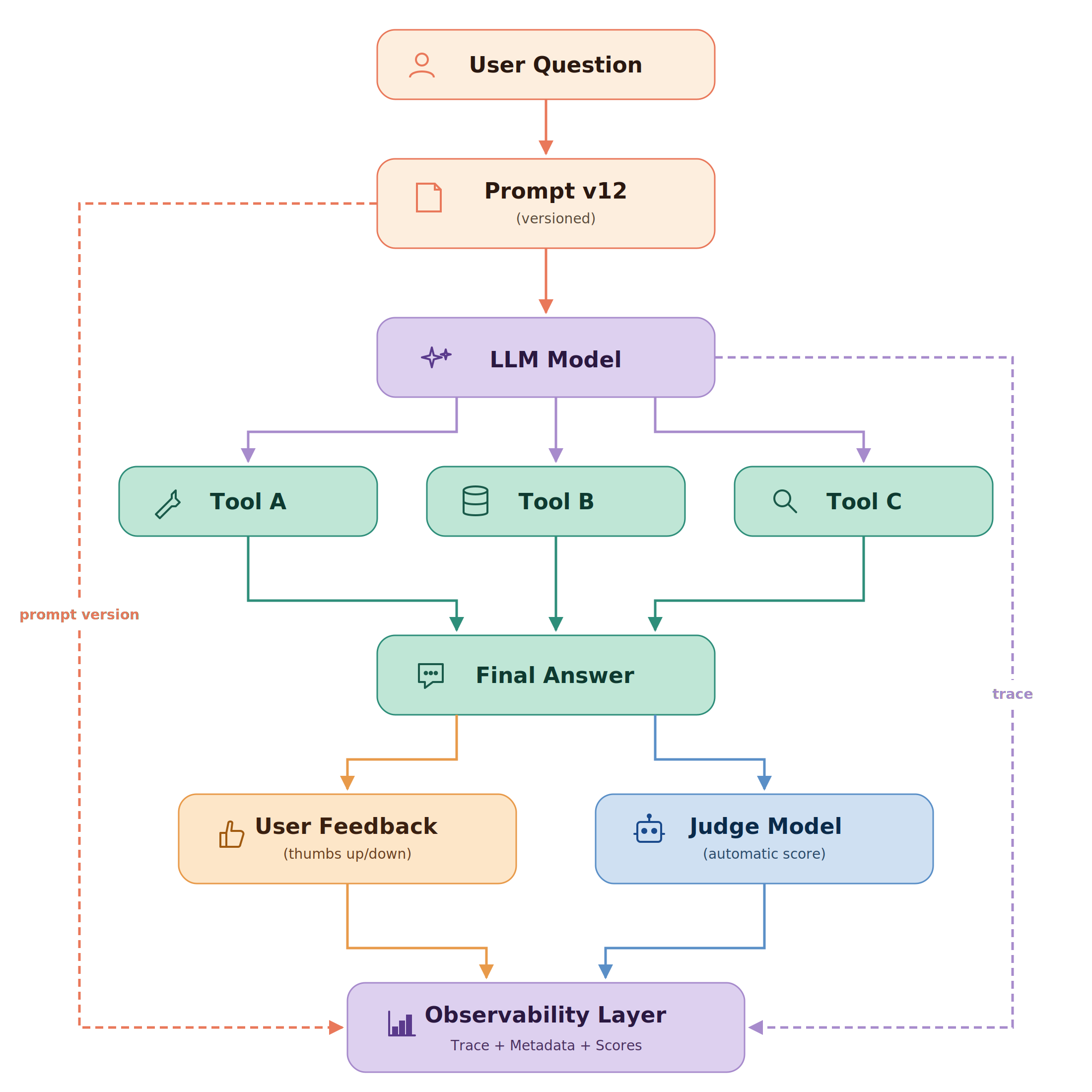
Four signals, one idea
The four signals overlap, and that’s on purpose. The prompt version shows up on the trace. The user score attaches to the trace. The judge score attaches to the trace too. They are not really four separate things. They are the same idea viewed from four different angles.
Make the AI feature observable, then you can change it on purpose.
For a while I treated AI features like a different category of software: less debuggable, less testable, less under our control. An AI feature is software. It has inputs, makes decisions, produces outputs, and can be observed like anything else.
The four signals overlap on purpose. They are one idea, make the system observable, viewed from four angles. What changes once you have them isn’t that the model gets smarter. It’s that you stop hoping. You ship a prompt change knowing the judge will tell if it regressed. You read a downvote knowing you can replay the exact conversation that produced it. You promote a new prompt to production knowing you can roll it back in one click if it breaks.
The model is the engine. The observability layer is the dashboard. You can drive without one. You just can’t drive on purpose.