As a product manager, my weeks are defined by context switching. Between working on a client project, internal initiatives, leadership meetings, 1:1s, investment time, or personal development, there’s a lot to hold at once. Each of those contexts has its own history, to-do lists, open questions, follow ups, and stakeholders.
The cognitive overhead of holding all of that while still being able to show up fully prepared used to be genuinely exhausting.
This is a quick guide to the system I’ve built to manage it. Of course this is a blog post about AI and I run the risk of sounding like a “996-vibe-codez-all-day” fanatic. But at the very least, it’s made a tangible difference in how present and prepared I feel day-to-day, and I hope some of the concepts or processes can be helpful to you too.
Also, remember, like anything in life (and especially in product development) it’s not perfect, it’s still evolving, and my naming schemes are definitely corny. Enjoy.
The three tools
The system runs on three tools working together:
- Gemini Meeting Notes (or your AI meeting note taker of choice): auto-generates transcripts and structured summaries of every Google Meet call
- Obsidian: local markdown note-taking app that serves as my personal knowledge base
- Claude Projects: separate AI contexts I maintain for each area of my work
Each tool solves a distinct problem. The value is in how they connect.
Gemini Meeting Notes: staying present in meetings
The biggest benefit here is simple: I rarely ever take notes during meetings.
For me, it changed the quality of my participation entirely. Not splitting my attention between listening and typing has allowed me to ask better follow-up questions, read the room, catch the things that don’t get said explicitly. Most importantly, I can actively listen.
Gemini runs in the background and handles the capture automatically. After each call, I get a structured summary and a full transcript. I don’t have to do anything during the meeting except show up and participate.
Obsidian: a local home for everything
Gemini notes are useful on their own, but raw meeting transcripts sitting in Google Drive aren’t a system and almost always end up in Google Drive purgatory. Obsidian is where I organize it all. If you’re not familiar with Obsidian, it’s basically an app that lets you organize and manage your files (mostly markdown) with a lot of bells and whistles.
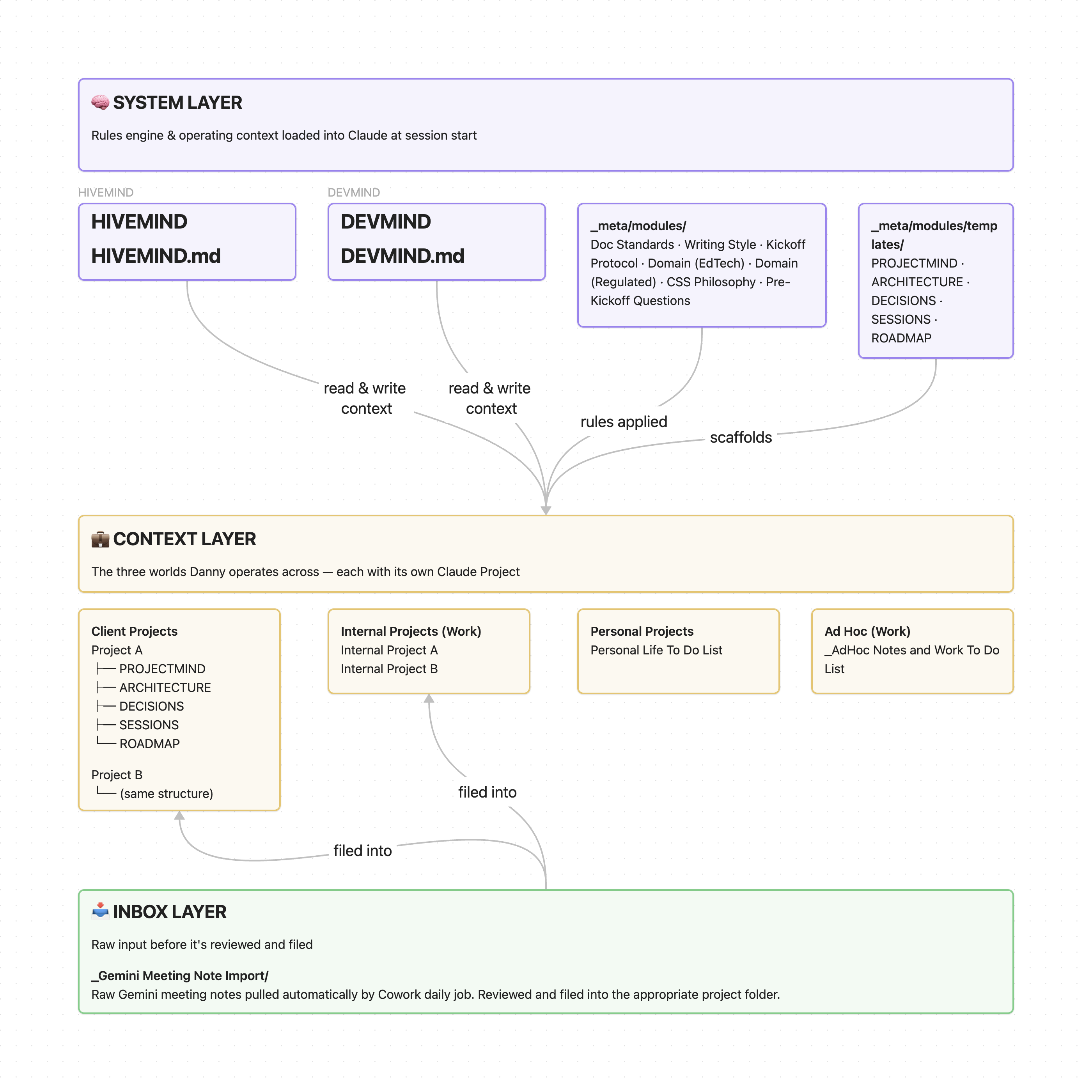
My Obsidian vault is structured around three contexts that map directly to how I actually work:
- Client Projects - one folder per engagement, each with a consistent set of files: project context, architecture notes, decision log, session notes, and a roadmap
- Internal Projects - thoughtbot team work, PM strategy, team lead responsibilities
- Personal - fun projects, personal development, and tracking progress on aspirational lifelong goals like folding the laundry before doing another load
On top of that sits a system layer: a file I called HIVEMIND.md that serves as a master operating index, and a set of contextual modules covering things like domain knowledge, process standards, documentation standards, and writing guidelines.
The structure is opinionated, but that’s the point. When every project folder looks the same, you spend zero time figuring out where to put something or where to look for it.
Claude: maintaining context across projects
The last piece is Claude Projects. On its own, Claude Projects is great if you keep all of the information and context within Claude. However, you start running into limitations once you have multiple projects because you’re essentially starting from scratch for every new project or chat. Also, the more you add to a Claude Project, the heavier every session becomes - burning through context limits faster over time.
Obsidian connects to Claude Desktop via an MCP plugin, so Claude can read my vault directly. When I start a session, it first loads my HIVEMIND.md which instructs Claude to only load whatever project files are relevant (this solves the issue of heavier Claude sessions). That handoff is what makes the whole system feel less like using a tool and more like working with someone who actually knows what’s going on.
The daily handoff: Gemini to Obsidian
I use a tool called Claude Cowork in conjunction with a free community plug-in (Local REST API for Obsidian - github repo or Obsidian page) that runs a daily job to pull new Gemini notes from Google Drive into a dedicated inbox folder in Obsidian. The notes land automatically and I just have to review/file them into the right project folder.
The best part is, even if I forgot to organize the meeting notes in Obsidian, the notes are still there and accessible for Claude to pull.
The part that actually matters
The system isn’t magic and I’m definitely not some jedi of the AI arts. Each tool is doing exactly one job and staying out of the way of the others. Gemini captures so I don’t have to. Obsidian organizes so nothing gets lost and context stays lean. Claude reads that context and picks up where we left off without me having to re-explain anything.
But honestly, the part that made the biggest difference wasn’t any individual tool. It was deciding that I can be the best version of myself when I can actually be present. And whether you’re a fan of AI or not, I think it’s safe to say a lot of the tools that are available today make it easier than ever to do just that.
Last bit of advice is if you want to try a version of this, don’t start with the whole stack. Start with whichever problem is loudest right now. Drowning in missed follow-ups from meetings? Try an AI note taker. Losing track of decisions across projects? Try Obsidian. Explaining the same context to Claude every session? Set up a Project with a HIVEMIND equivalent. Build the connections once each piece earns its place in your own workflow.