---
title: Vimulator
teaser:
tags: vim,javascript
author: George Brocklehurst
published_on: 2012-12-10
---
## Demonstrating Vim
Have you ever noticed that Vim demonstrations can sometimes feel a lot like
watching a magic show? It's very impressive, but if you want to work out how it
was done you're going to have to do some reading when you get home. If they're
not careful delivered, demonstrations that are meant to teach new users about
Vim can end up contributing to the [Vim learning curve
myth][blog_learning_curve] and scaring the would-be user away.
## A Vim simulator
Vim's just not designed for demonstrations, and for a beginners talk at a
[Stockholm Vim meetup][stockholm_vim] I needed something that looked a little
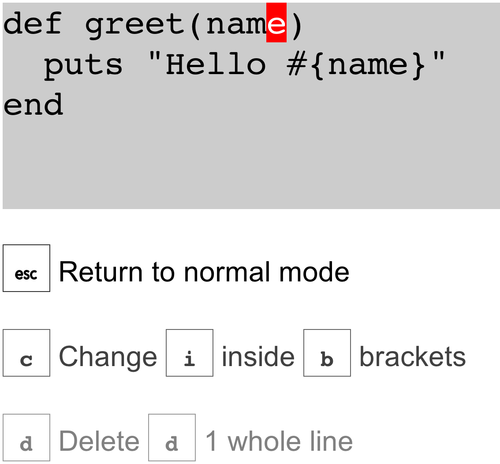
less magical. The solution was to write [Vimulator][vimulator], a JavaScript Vim
simulator that's designed to explain each key stroke as it happens and delay the
effect on the text long enough for a casual observer to see what's going on.
[](http://thoughtbot.github.com/vimulator/)
Currently Vimulator supports around 40 normal mode commands including most of
the basic motions, the c and d operators, a couple of text
objects, and a few simple change and deletion commands (there's a full list in
the [Vimulator README on GitHub][vimulator-readme]).
As a command is built up, Vimulator updates the description so you always know
what's going on. Since a lot of Vim's power comes from the ability to combine
operators and motions to create sentence-like commands it's helpful for a new
user to see what each piece does as a command is constructed, and to be able to
still see the context once the demonstrator's moved on to describing the next
part of the command.
## Writing tests for Vim, in Vim
One of the fun things about writing a Vim simulator in Vim is acceptance
testing. For each test I'd start by setting up the simulator with some useful
text, and add an expectation that when no keys are pressed, nothing will change:
it("changes the word", function () {
reset("Hello world");
pressKeys("");
expect(currentText()).toBe("Hello world");
});
Then I'd modify the expected text using whichever command was under test, and
record my key strokes as a [Vim macro][blog_vim_macros]:
qq # Start recording
wcwthere # Exercise the `cw` command
q # Stop recording
Macros record to registers, so you can put the contents of a macro as if it
was some text that had been yanked. I'd drop the contents of the macro into the
`pressKeys` call with `"qp`, and swap out any special characters for a
JavaScript friendly representation:
it("changes the word", function () {
reset("Hello world");
pressKeys("wcwthere" + ESC);
expect(currentText()).toBe("Hello there");
});
Testing this way guaranteed accuracy: The expectations are generated by the
target of the simulation.
## Try it out
Next time you're explaining Vim to a colleague, [give Vimulator a
try][vimulator], or if you've been put off before by introductions that felt
like a magic show we've got some posts and videos to help you [learn
vim][learn_vim].
[learn_vim]: https://thoughtbot.com/upcase/vim
[blog_learning_curve]: https://thoughtbot.com/blog/post/13164810557/the-vim-learning-curve-is-a-myth
[blog_vim_macros]: https://thoughtbot.com/blog/post/15348543318/vim-macros-and-you
[stockholm_vim]: http://meetup.com/Stockholm-Vim/
[vimulator]: http://thoughtbot.github.com/vimulator/
[vimulator-readme]: https://github.com/thoughtbot/vimulator#readme