---
title: Streaming downloads proxy service with Node.js
teaser: 'Use microservices to compose and analyse light-weight declarative data pipelines.
'
tags: javascript,rails,new bamboo,web
author: Ismael Celis
published_on: 2014-03-31
---
_This post was originally published on the New Bamboo blog, before [New Bamboo
joined thoughtbot in London][new-bamboo-thoughtbot]._
---
## Context
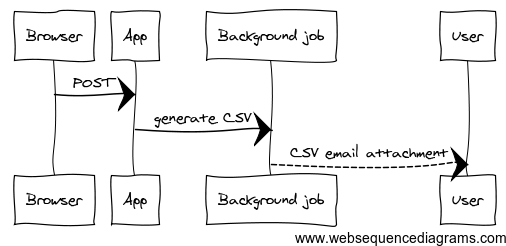
I recently had to refactor functionality where a user could export historical
data as CSV files. The original implementation, part of a bigger Rails app,
would schedule a background job to generate potentially big CSV files and send
them to the user as email attachments.
The original design
This worked for a few years, but as the data grew it became problematic because
it required loads of resources just to load data and generate files in memory,
email deliverability was inconsistent, it wasn't as flexible as required by
users and it made the codebase more bloated and brittle than necessary.
## Design
As part of a general move towards a more [Microservices]-style in the
architecture of this application, I had already built a REST API that exposed
the same data as paginated JSON collections, so I decided to leverage that and
build a separate small proxy process that would gradually load all pages for a
given query and assemble them into a streaming download of CSV data.
The new, service oriented design
Here's the step-by-step:
1. The user selects one or more filters and submits a form to the Rails app.
2. The Rails app generates and redirects to a URL for the Streaming CSV Service.
3. The Streaming CSV Service makes one or more page requests to the REST API,
piping results back to the response.
4. The browser initiates the file download as the data continues to stream.
5. When the last page is streamed, the server closes the connection.
The concept is simple but the implications important: it means that the proxy
process transforms the data and flushes it to an open connection as it comes, 1
page at a time. There's only 1 page worth of data held in memory at any given
time so there are no technical constraints as to how much data can be
downloaded. At the same time, all of the data-lifting is handled by a regular
request-response API in the backend.
## Implementation
While the paginated REST API is written in Ruby, I decided to write the
streaming-downloads proxy in Node.js for its nice [Stream] interface. I
abstracted the pages-to-stream pipeline into [a stream-like object] that can be
piped into other modules that implement Node's streams. I use this along the
[ya-csv] module to compose an API -> ApiStream -> CSV -> HTTP response pipeline.
```javascript
// pipe generated CSV onto the HTTP response
var writer = csv.createCsvStreamWriter(response)
// Turn a series of paginated requests to the backend API into a stream of data
var stream = apistream.instance(uri, token)
// Pipe data stream into CSV writer
stream.pipe(writer)
```
I also send the `Content-Disposition: attachment` response header to force
browsers to pop up the download dialog to users.
```ruby
response.setHeader('Content-Type', 'text/csv');
response.setHeader('Content-disposition', 'attachment;filename=' + name + '.csv');
```
### Mappers
So far, so elegant. In reality, however, I don't just need to transform each
individual API resource into corresponding CSV rows. For example, when
downloading `Order` resources I need to map a single order into many CSV rows
representing the line-items inside the order. If an order comes out of the API
in the following format:
```json
{
"code": "123EFCD",
"total": 80000,
"status": "shipped",
"date": "2014-02-03",
"items": [
{"product_title": "iPhone 5", "units": 2, "unit_price": 30000},
{"product_title": "Samsung Galaxy S4", "units": 1, "unit_price": 20000}
]
}
```
I need the CSV file to contain 2 rows, one for each item and both duplicating
the order information, as in:
```csv
code, total, date, status, product, units, unit_price, total
123EFCD, 80000, 2014-02-03, shipped, iPhone 5, 2, 30000, 80000
123EFCD, 80000, 2014-02-03, shipped, Samsung Galaxy S4, 1, 20000, 80000
```
So I introduced a [mapping layer][order-mapper] in the pipeline that maps fields
in the API JSON responses onto one or more CSV rows.
```javascript
var writer = csv.createCsvStreamWriter(res);
var stream = apistream.instance(uri, token)
var mapper = new OrdersMapper()
// First line in CSV is the headers
writer.writeRecord(mapper.headers())
// mapper.eachRow() turns a single API resource into 1 or more CSV rows
stream.on('item', function (item) {
mapper.eachRow(item, function (row) {
writer.writeRecord(row)
})
})
```
Mappers could be streams themselves but for now the code is clear enough that I
didn't feel the need for it.
API response mappers are a useful pattern not only because they allow clean data
transformations but also protect the rest of the code from changes in the API
data structures. This is a pattern that I've reached for before in Ruby in the
form of my [HashMapper gem] gem.
### Parameter definitions
The original implementation only allowed to download the full data set for each
resource type (orders, products, contacts). The new REST API can filter by
things like date and price ranges, statuses and even geo-location, so I wanted
to expose the same fine-grained control to the CSV downloads service. This is
easy because I just need to forward parameters onto the API and map the returned
data, but I also wanted sensible defaults for missing parameters. For that I
introduced a [parameter-declaration] layer.
```javascript
var OrdersParams = params.define(function () {
this
.param('sort', 'updated_on:desc')
.param('per_page', 20)
.param('status', 'closed,pending,invalid,shipped')
})
```
I use param declaration objects to filter the incoming query string and apply
validations and defaults before forwarding them to the backend API.
```javascript
var writer = csv.createCsvStreamWriter(res);
var params = new OrdersParams(request.query)
// Compose API url using sanitized / defaulted params
var uri = "https://api.com/orders?" + params.query;
var stream = apistream.instance(uri, token)
var mapper = new OrdersMapper()
writer.writeRecord(mapper.headers())
stream
.on('item', function (item) {
mapper.eachRow(item, function (row) {
writer.writeRecord(row)
})
})
.on('end', function () {
response.end()
})
```
Again, param definitions are a useful pattern for all sorts of apps. I wrote the
[Parametric] gem to help with that in Ruby apps.
## Web tokens
The last piece of the puzzle is to secure the streaming CSV downloads. Only
authorised users should be able to download the data. The Node app sends a
stored Oauth Token to the API with every request, but I wanted a simple way for
the front-end Rails app to generate one-off secure download URLs to the
downloads Node proxy. For that I use the [JSON Web Token] standard to encode all
the query parameters into a signed string that the Node app can decode using a
shared secret. In the Rails app:
```ruby
# controllers/downloads_controller.rb
def create
url = Rails.application.config.downloads_host
download_options = params[:download_options]
# Add an issued_at timestamp
download_options[:iat] = (Time.now.getutc.to_f * 1000).to_i
token = JWT.encode(download_options, Rails.application.config.downloads_secret)
# Redirect to download URL. Browser will trigger download dialog
redirect_to "#{url}?jwt=#{token}"
end
```
This action is executed by a simple HTML form and redirects the browser to the
Node downloads app, which in turn responds with a `Content-Disposition:
attachment` header that commands the browser to initiate a streaming download.
CSV download form
The Node app uses a custom middleware function to validate the JWT token and
decode the API parameters. Tokens are only valid for a few minutes from the date
encoded in the `iat` (Issued At) parameter.
## Summary
* Use proxy processes to transform existing APIs into customised streams or
data formats.
* Apply a language-agnostic approach where each service uses the best tool for
the job.
* Apply patterns such as mappers, streams and parameter definitions to compose
light-weight declarative data pipelines.
* Leverage simple standards and libraries such as JSON Web Tokens to secure your
micro services.
## Slides
Update: These are the slides for a talk on this subject at the London Node User
Group, 23 April 2014.