---
title: Recommending blog posts with machine learning
teaser: How we recommend similar posts with an LDA topic model.
tags: machine learning,natural language processing,python
author: George Brocklehurst
published_on: 2018-07-30
---
Regular readers of Giant Robots may have noticed that we recently added links to
recommended posts at the end of every post on the blog. The intention is to help
you find more posts that might be interesting to you. In this blog post I'm
going to get a little meta and talk about how we did that.
[This blog has been around for more than a decade][10-years], and has more than
1,600 posts. That's a lot of content to curate by hand, so when we wanted to add
related posts, we knew we needed an automated solution.
## What makes a good related post?
Ideally, the posts we recommend will be on similar topics to the one you just
finished reading.
We could consider using tags for this, but that doesn't give us much to work
with. Our average post has 2 or 3 tags, and while there are around 300 tags in
total, there are only 47 that we've used more than 10 times. If you were looking
at a post with a very popular tag—like [web][tag-web], or
[rails][tag-rails]—we'd have a lot of posts with the same tag that we could
recommend, but little information to narrow down which of those posts would be a
good follow-up to the one you're reading.
What we need is a more fine-grained approach to identifying the topics
covered by each post.
## Enter topic modelling
A topic model is a statistical model for discovering topics in a corpus of
documents, based on words that commonly appear together. Documents typically
cover multiple topics, giving different emphasis to each topic. For example a
post that is mostly about Test Driven Development might also touch on some Ruby
on Rails concepts in the examples it uses, in which case we'd expect to see lots
of words associated with the TDD topic and a scattering of words from the Rails
topic.
This can be very useful for finding related posts, because we can search for
similarities not just to one topic, but to the whole topic distribution of the
post. If you just finished a post that's mostly TDD with a hint of Rails, we can
recommend other posts that focus on TDD and mention Rails.
## The gory details
That covers the _why_ and the _what_, let's take a look at _how_.
We opted for a [latent Dirichlet allocation (LDA)][lettier] model, because it's
widely used, implemented by some well-supported libraries, and was something
we'd already experimented with for other projects. If you want to understand how
the algorithm works, I recommend [David Lettier's _Your Easy Guide to Latent
Dirichlet Allocation_ on Medium][lettier].
As is often the case with machine learning problems these days, there are great
libraries available for the model itself—we used the [gensim Python
library][gensim] here—and most of the code we needed to write deals with
preparing the data, selecting the right parameters for the model, and using the
model's output.
### Preparing the data
As with many natural language processing libraries, gensim expects documents to
be represented as a [bag of words][bow], which meant there was some
pre-processing to do. Each blog post goes through the following stages:
1. We write our posts in **Markdown**, so each post starts out as a big old
Unicode string, something like this:
```python
'''
I recently wrote about using [machine learning
to understand ingredients in recipes][NER]. There's
no way I could consider every possible format for
recipe ...
'''
```
2. We're not interested in anything but the raw **text**, so we can strip out
any Markdown formating or HTML tags. In practice, it proved easier to go
from Markdown to HTML, and then from HTML to text.
```python
'''
I recently wrote about using machine learning
to understand ingredients in recipes. There's
no way I could consider every possible format for
recipe ...
'''
```
3. Next we want to split the text into **tokens**, each of which is an
interesting word. Gensim has a [`simple_preprocess`][gensim-simple_preprocess]
function we used for this. We also used the list of [stop words][stop-words]
from the [Natural Language Toolkit (NLTK)][nltk] to prevent common words like
`and`, `the`, `but` or `if` from being considered—we don't want our topics
to be confused with irrelevant words that just happen to appear in some
posts more often than they appear in others. After this tokenizing step,
our example post looks like this:
```python
['recently', 'wrote', 'using', 'machine', 'learning',
'understand', 'ingredients', 'recipes', 'way', 'could',
'consider', 'every', 'possible', 'format', 'recipe',
... ]
```
4. Some of our tokens are really part of multi-word phrases. In this example,
it's going to be more useful to consider `machine learning` to be one token
instead of an instance of the token `machine` and a separate instance of the
token `learning`. To account for this we next merge **bigrams and trigrams**,
by using [gensim's phrase model][gensim-phrase]. The result is similar,
but some of the tokens have been combined:
```python
['recently', 'wrote', 'using', 'machine_learning',
'understand', 'ingredients', 'recipes', 'way', 'could',
'consider', 'every', 'possible', 'format', 'recipe',
... ]
```
5. Next up, we want to **lemmatize** the tokens, so that words with the same
root, like `recipes` and `recipe` will be treated as the same token. We used
[spaCy][spacy]'s lemmatizer. We could have used NLTK here too, but it's a
little more involved than spaCy because NLTK provides various models from
different sources, and there's sometimes manual translation required
to go from one to another.
```python
['recently', 'write', 'use', 'machine_learn',
'understand', 'ingredient', 'recipe', 'way', 'could',
'consider', 'every', 'possible', 'format', 'recipe',
... ]
```
6. In our final filtering step, we use **parts of speech** tags—also from
spaCy—to drop any tokens that aren't likely to be useful. We'll keep the
nouns, adjectives, verbs, and adverbs, and drop the rest.
```python
['recently', 'write', 'use', 'machine_learn',
'understand', 'ingredient', 'recipe', 'way', 'could',
'consider', 'possible', 'format', 'recipe',
... ]
```
7. Finally we're ready to turn this into a **bag of words**, which is a list
of tuples, each containing a word, and the number of times the word
occurs in the post.
```python
[('recently', 1), ('write', 1), ('use', 1), ('machine_learn', 1),
('understand', 1), ('ingredient', 1), ('recipe', 2), ('way', 1),
('could', 1), ('consider', 1), ('possible', 1), ('format', 1),
... ]
```
In practice gensim uses a [`Dictionary` class][gensim-dictionary], which
maps each word to a unique ID. The bag of words representing each post
uses the IDs to save storing, passing around, and comparing thousands of
bulky Unicode strings.
```python
# Dictionary.token2id
{'recently': 0, 'write': 1, 'use': 2, 'machine_learn': 3, ... }
# Bag of words
[(0, 1), (1, 1), (2, 1), (3, 1), ... ]
```
### Parameter selection
Once the data was in the right format, we could train the model.
The most important parameter to choose for an LDA topic model is the number of
topics. With too few topics, the model won't really capture the full scope of
the blog. With too many topics, the model will learn artificial distinctions
that may be present in the words used in the content, but won't really matter to
a reader of the blog. Either way, the recommendations the model makes will
suffer.
We took the usual approach: decide on a metric that tells us our model is good,
and try various parameter values until we find the one that yields the best
result for our chosen metric.
A common metric for topic models is _coherence_, which is based on the
likelihood of the words that make up a topic appearing in the same document. The
more likely it is that the topic's words appear together, the more coherent the
topic is.
Conveniently, gensim provides a [`topic_coherence`][gensim-topic_coherence]
function that we used to evaluate different models with different numbers of
topics.
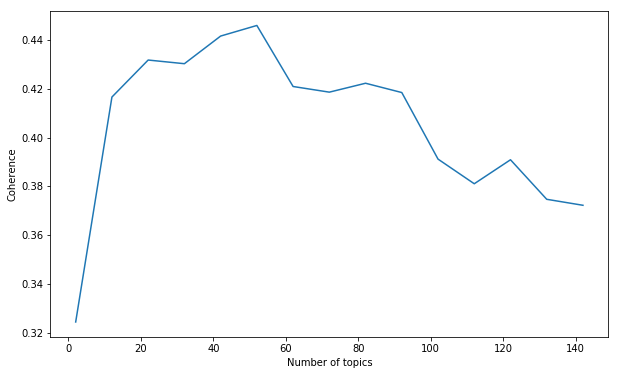
We started by training 15 models at 10-topic intervals: a model with 2 topics, a
model with 12 topics, a model with 22 topics, and so on. It looked like the peak
coherence was somewhere in the first half of the range:
Plot of coherence against number of topics, at intervals of 10 topics.
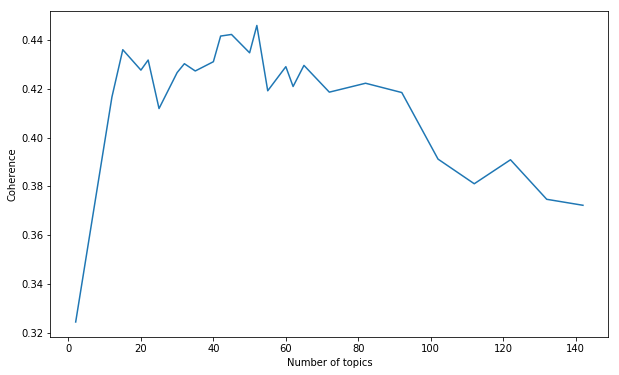
From there, we could refine our search. We trained models at 5-topic intervals
from 15 up to 70:
Plot of coherence against number of topics, at intervals of 10 topics,
decreasing to intervals of 5 topics near the peak coherence value.
After a few more iterations, we found the coherrence peaked at 52 topics.
### The topics
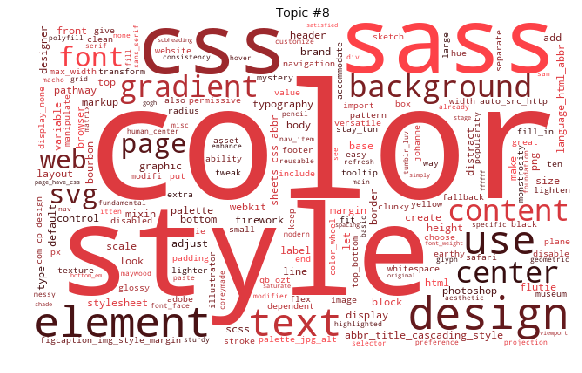
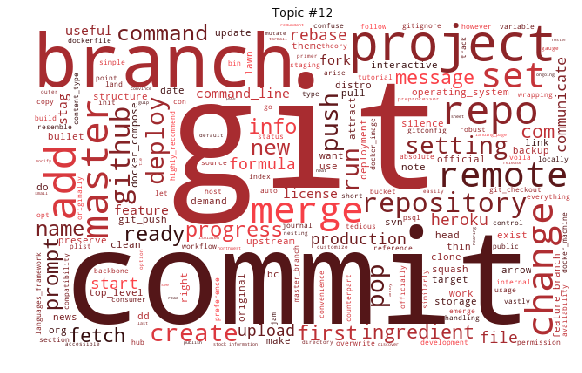
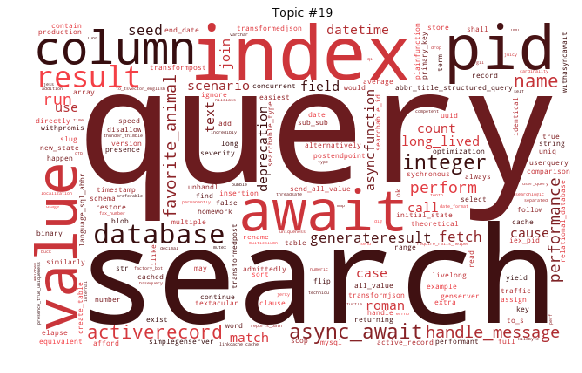
Since a topic consists of a list of words, weighted by the probability they
occur in a document that is about the topic, we can use those words and
weightings to generate word clouds! The topics aren't all easy to understand, as
is usually the case with a topic model, but there are some which show a very
clear theme.
Topic #8 covers writing CSS, with words like color, style, css, and sass.
Topic #12 covers git, with words like git, commit, branch, project,
add and merge.
Topic #19 covers databases, with words like query, search, index and value.
### From topics to recommendations
After all this work we had a topic model, but we still didn't have recommended
posts on the blog!
When we run a new post through the topic model, we get a vector of 52 values
representing how strongly correlated the post is to each topic. To find similar
posts, we need to find posts that have similar topic distributions.
We do this using the [Jensen-Shannon distance][jensen-shannon], which is a
popular measure for the similarity of two probability distributions. The
recommendations you see at the end of every post are the three posts whose topic
distribution has the smallest Jensen-Shannon distance from the topic
distribution of the post you just read.
When our blog engine imports new content from GitHub, it
now requests new recommended posts from our topic modelling app, which we called
Sommelier. It takes a minute or two to build a new model and calculate the J-S
distance between each pair of posts, so Sommelier does that work in the
background using [Celery][celery] and posts the results back to the blog engine to be
stored in its database.
## Acknowledgements
- [Rachel Brynsvold's PyTexas 2017 talk][rb-talk] is where I first learnt about
topic modelling.
- [killerT2333's Kaggle Notebook][kt-notebook] is where I learnt about using
Jensen-Shannon distance to compare topic vectors.
## The moment of truth
Having reached the end of this post, you're about to see the topic
recommendation system in action. Check out the (probably!) related posts
below—how do you think the model did?
[10-years]: https://thoughtbot.com/blog/ten-years-of-the-giant-robots-blog
[bow]: https://en.wikipedia.org/wiki/Bag-of-words_model
[celery]: http://www.celeryproject.org/
[gensim-dictionary]: https://radimrehurek.com/gensim/corpora/dictionary.html
[gensim-phrase]: https://radimrehurek.com/gensim/models/phrases.html
[gensim-simple_preprocess]: https://radimrehurek.com/gensim/utils.html#gensim.utils.simple_preprocess
[gensim-topic_coherence]: https://radimrehurek.com/gensim/models/coherencemodel.html
[gensim]: https://radimrehurek.com/gensim/index.html
[jensen-shannon]: https://en.wikipedia.org/wiki/Jensen%E2%80%93Shannon_divergence
[kt-notebook]: https://www.kaggle.com/ktattan/lda-and-document-similarity
[lettier]: https://medium.com/@lettier/how-does-lda-work-ill-explain-using-emoji-108abf40fa7d
[nltk]: https://www.nltk.org/
[rb-talk]: http://2017.pytexas.org/talk/U2Vzc2lvbk5vZGU6Mzk=
[spacy]: https://spacy.io/
[stop-words]: https://en.wikipedia.org/wiki/Stop_words
[tag-rails]: https://thoughtbot.com/blog/tags/rails
[tag-web]: https://thoughtbot.com/blog/tags/web