---
title: flexboxes + media queries = awesome layouts
teaser: 'Flexboxes provide an awesome way of letting your web browser arrange the
layout of your page in a systematic way.
'
tags: css,new bamboo,web
author: Lee Machin
published_on: 2014-03-10
---
_This post was originally published on the New Bamboo blog, before [New Bamboo
joined thoughtbot in London][new-bamboo-thoughtbot]._
---
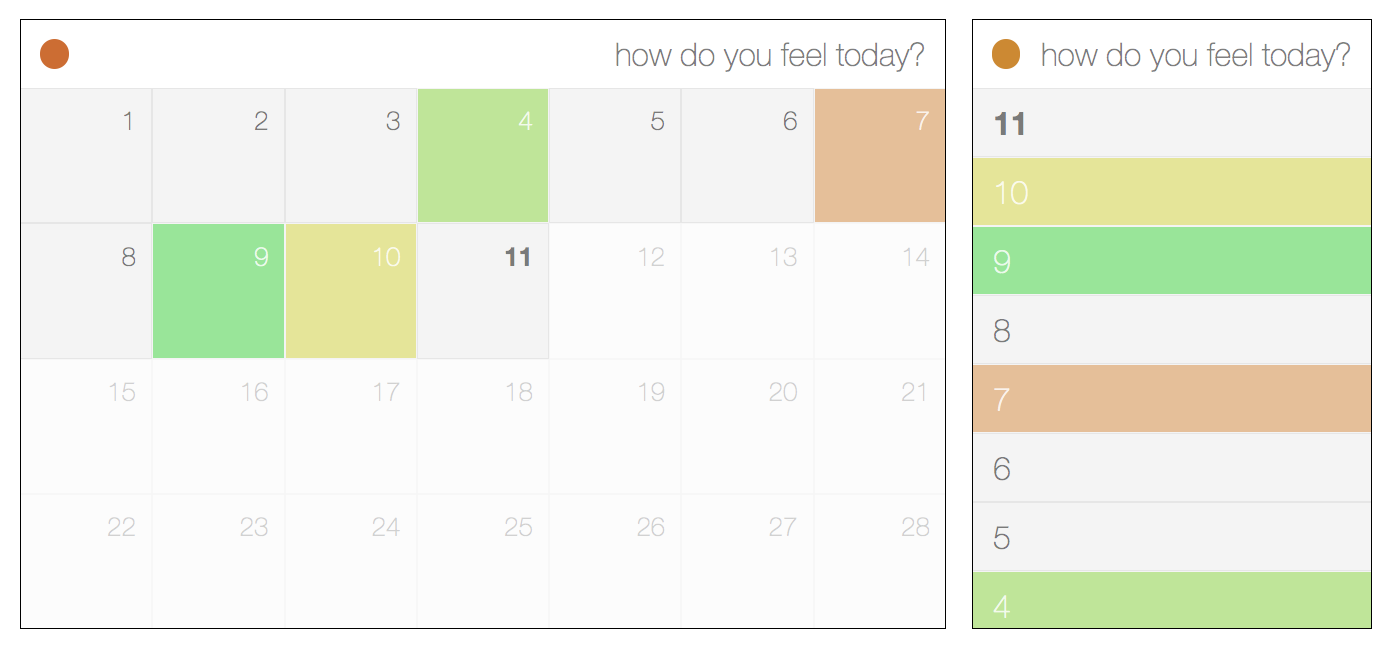
A calendar-like thing in its infancy, based on the examples provided
Flexboxes, a very recent addition to the CSS standard, allow you to leave the
responsibility of arranging your layout to the browser. They have the additional
benefit of simplifying your markup (no more wrapper elements), and reducing the
dependency on JavaScript to arrange your UI independent of the ordering of the
DOM.
More to the point, you can leave your CSS grid frameworks ([960.gs], [Semantic
Grid], [Frameless Grid], part of [Twitter Bootstrap]) at the door, because
flexboxes obviate the need to create complex arrangements of rows, columns, and
what is basically a noodle-soup of wrappers and divs and all manner of things
that really have nothing to do with the actual content you care about.
With that in mind, I want to explore the sort of things you can do in
combination with responsive design and minimal markup, and a calendar seems a
good thing to try out!
Also note that, at the time of writing, this won't appear correctly in anything
except Firefox 29+ (Aurora channel), Google Chrome, or IE 11, so be sure to have
a nosey in one of those browsers to get the full benefit of these examples.
The fully responsive list/grid calendar view.
Open it full-screen to see it in action.
## Creating the list
This calendar was designed with mobile-first responsiveness in mind, which
basically means you write CSS to cater for the smallest display first and then
add media queries when the design no longer appears to be functional. In this
case, I started off with a simple list and then turned it into a grid when it
started to look bad.
This is what I started off with. Flick between the HTML and CSS tabs to see what
exactly is happening.
The (non-responsive) CSS for a plain old list
The first thing you may have noticed is that the days are arranged in ascending
order in the markup; but the order is reversed when displayed. It doesn't make
sense to have the current day right at the bottom of the page, and by specifying
the [`flex-direction`], we can control whether the elements stack on top of each
other or float next to each other, and if they do it in reverse or in the order
the markup defines.
The cells themselves aren't much more complicated. We just want to make sure
that the text is vertically centred, which we do by setting [`align-items`] to
`center`; and then we horizontally align the text to the left with
[`justify-content`]. Be aware that alignments can change behaviour depending on
the `flex-direction` you set. `justify-content` follows the direction (left to
right by default), and `align-items` runs perpendicular to it. So, if
`justify-content` aligns horizontally, `align-items` will align vertically. Also
note that `flex-start` and `flex-end` don't always refer to `left` and `right`,
but also `top` and `bottom`, and *also* the reverse of each. It all depends on
the direction of flow.
Flexboxes don't wrap by default, so the list still looks and appears to behave
like a list element, and we haven't had to add any markup to get the alignment
right. But what about the grid view for larger screens?
## Scaling it up
The (non-responsive) CSS for creating a grid
Not a great deal has changed. The elements within the calendar now flow from
left to right, and the [`flex-wrap`] property is set to `wrap`, so they flow
across multiple lines, pretty much like how `float`ed elements work.
The cells are no longer full-width, and we want to show seven of them on each
row. Normally this would be achieved through judicious usage of `margin`,
`padding`, `width`, and maybe even some extra markup. All we need to use,
though, is [`flex-basis`], which allows us to set the size of a cell. In this
case, it's the `width`, since the `flex-direction` is `row`, and the cells flow
from left to right. The end result is that we have four or five rows of cells
that are fluid with the width of the page, but there is still valuable
real-estate at the bottom. We don't need flexboxes to fix that, but we do need
to make sure that the page completely fills the viewport.
# Finishing touches
We know that most months in the [Gregorian calendar] are just over four weeks
long on average, with the exception of February outside of a Leap Year, which is
exactly four weeks long. Setting the height, then, is as simple as knowing how
many weeks there are. For a typical February, that's `25%` (`1/4`), and for
every other month it's `20%` (`1/5`), because we round up.
# Is that it!?
This is by no means the most complicated example of an automatic layout, and
it's not exactly impossible to pull off in older, cross browser compatible CSS.
To think about it purely in those terms, though, is to completely miss the
point. You could do a lot more complex things, but the simple stuff is *even
simpler*. It requires practically none of the thought that other approaches
demand, where you have to mysteriously twiddle digits (with to-the-pixel
precision) until your layout behaves correctly.
It took a few lines of CSS and *one* ordered list to create a responsive
calendar that re-orders and shape-shifts to best fit the display, and the rest
was all in the name of prettiness and UX. I don't want to think about what I
would have had to do without that, or how much more inconvenient it would have
been.
If you want to see what else you can do with flexboxes, be sure to point your
browser to [Solved by Flexbox]. It contains some examples of more complex things
(such as grids and vertical alignment) made simple.
Flexboxes, in a word, are **fantastic**.
[`align-items`]: https://developer.mozilla.org/en-US/docs/Web/CSS/align-items
[`flex-basis`]: https://developer.mozilla.org/en-US/docs/Web/CSS/flex-basis
[`flex-direction`]: https://developer.mozilla.org/en-US/docs/Web/CSS/flex-direction
[`flex-wrap`]: https://developer.mozilla.org/en-US/docs/Web/CSS/flex-wrap
[`justify-content`]: https://developer.mozilla.org/en-US/docs/Web/CSS/justify-content
[960.gs]: http://960.gs
[Frameless Grid]: http://framelessgrid.com
[Gregorian calendar]: https://en.wikipedia.org/wiki/Gregorian_calendar
[new-bamboo-thoughtbot]: https://thoughtbot.com/blog/new-bamboo-joins-thoughtbot-in-london
[Semantic Grid]: http://semantic.gs
[Solved by Flexbox]: http://philipwalton.github.io/solved-by-flexbox
[Twitter Bootstrap]: http://getboostrap.com