---
title: Basic CSS Selector Syntax Explained Using Cats
teaser: CSS can be tricky. Learn some basic selector syntax with cats!
tags: fun,css,design,web,frontend,back to basics
author: Mike Borsare
published_on: 2015-10-26
---

Are you a visual learner? Do you resemble our bewildered friend above when
trying to target elements for styling? If so, don't worry, we'll soon remedy
that. If you're just starting to learn basic selector syntax it can be hard to
remember what does what. I've created this cat-based primer to guide you. Enjoy!
## Target a Parent
Selecting a parent is as simple as using a class, id or element as your
selector. Follow this with a [declaration
block](//developer.mozilla.org/en-US/docs/Web/CSS/Syntax) and you're in
business. Here's an example of the corresponding markup and styles,
respectively.
```html
```
```css
.parent {
border: 10px solid cyan;
}
```
Here's how it affects the
[DOM](//developer.mozilla.org/en-US/docs/Web/API/Document_Object_Model), with
blue highlighting the targeted element:

## Target a Child
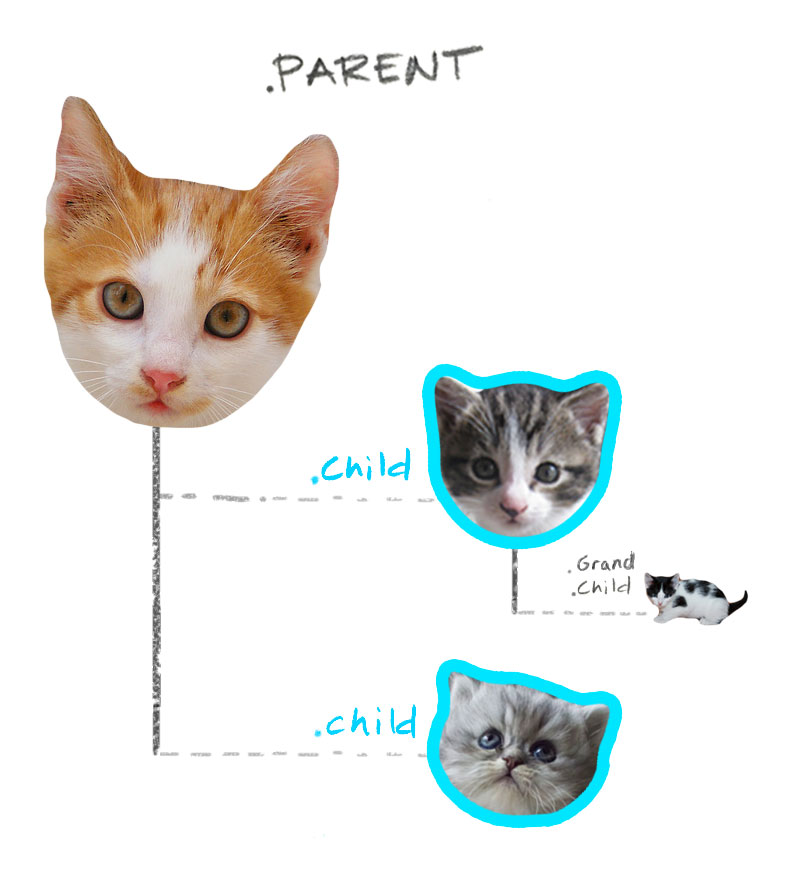
It’s helpful to think about children in two different ways. First, there are
direct children. Second, there are descendants. Direct children are immediately
nested within a parent. Descendants include immediate children, but also any
matching element further down the DOM.
### Targeting a Direct Child
Placing a `>` between selectors tells the browser to find the first selector
(the parent) and then go inside of it to find the second selector (its child).
In the following example we're looking for any element that's immediately nested
within `.parent` with the class of `.child`.
```html
```
```css
.parent > .child {
border: 10px solid cyan;
}
````
Here’s how it affects the DOM:
### Targeting a Descendant
The descendant selector is less specific than the direct child selector. It
targets any element within a parent that has the class of `.child` no matter how
far down the DOM tree it resides. To use it we place a space between
selectors. In the following example we’re looking for any element nested
within `.parent` with the class of `.child`.
```html
```
```css
.parent .child {
border: 10px solid cyan;
}
````
Here’s how it affects the DOM:

## Target an Adjacent Sibling
An adjacent sibling is an element that resides next to, and on the same level of
the DOM as another. Targeting them is simple. In this case what we need to do is
join the selectors together with a `+`. Check out the example below.
```html
```
```css
.parent + .sibling {
border: 10px solid cyan;
}
```
Here’s how it affects the DOM:

## Using Multiple Selectors
Sometimes you want to apply styles to multiple elements. So how does that work?
The answer is quite simple. All one has to do is separate each selector with a
comma. Here's an example.
```html
```
```css
.parent,
.child {
border: 10px solid cyan;
}
```
Here’s how it affects the DOM:

## Finish Strong
To learn even more about CSS selectors (though sadly with no cats), try [CSS
Diner](http://flukeout.github.io/), which will lead you from basic to complex
selectors using delicious food.
### Props
Thanks to all the cat lovers of Flickr. All cats herded under [Creative Commons
Attribution 2.0 Generic](//creativecommons.org/licenses/by/2.0/).

[header-cat](//flic.kr/p/oczbW) |
[parent-cat-one](//flic.kr/p/6v2WG4) |
[kitten-one](//flic.kr/p/p4hE6h) |
[kitten-two](//flic.kr/p/cWxtYy) |
[full-cat-one](//flic.kr/p/igi3Y9) |
[full-cat-two](//flic.kr/p/dmK2CR) |
[goofy-cat](//flic.kr/p/mC8vqC) |
[sibling-cat](//flic.kr/p/doo6PL)